ClipForage finds green-screen memes, B-roll, overlays, sound effects, music, fonts and LUTs across YouTube and free stock libraries, shows the license on every result, and downloads mp4 or mp3 in one click.
A local, open-source tool for video editors. Runs on your machine. No account, no hosted service, no bundled keys or binaries.
Windows / macOS / Linux · Python 3.12+ via uv or pipx · MIT license · Alpha
[ SYSTEM://CLIPFORAGE ]
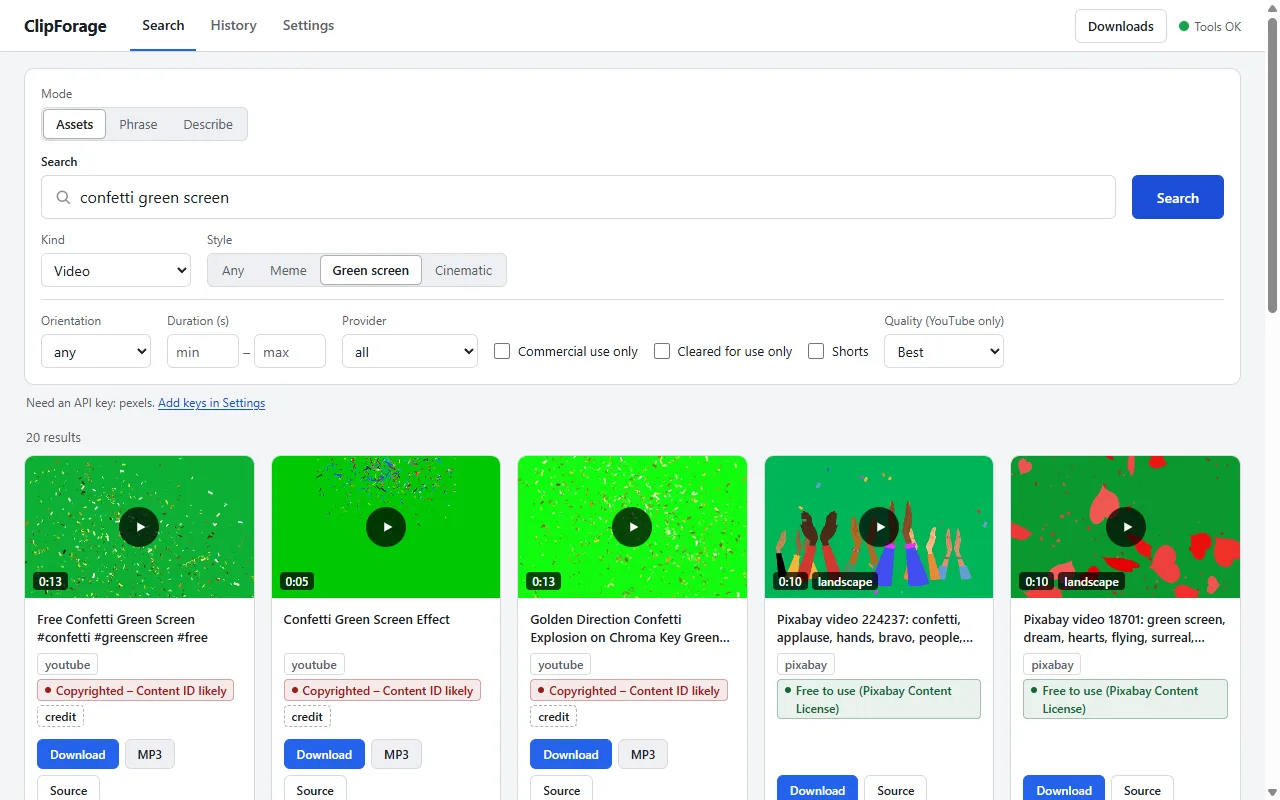
The local web UI: search results with a rights label on every card, filters, previews and one-click downloads.
Built around the edit, not the source.
Editors search by what they are making. ClipForage weights its ten providers for the style of the cut and keeps the license next to every result.
Meme and green-screen edits
Find green-screen meme clips, meme sounds and music, then download mp4 or mp3, including a clip range. Describe a meme instead of naming it: “dog in burning room” also searches “this is fine” from an offline table of 129 memes. Key out the green screen into a transparent WebM.
Cinematic edits
Search free B-roll on Pexels, Pixabay, Mixkit, Internet Archive and Wikimedia Commons, filtered by orientation and duration, with links out to free LUT packs.
Vlog edits
Pull music and SFX, animated overlays from LottieFiles, fonts from Google Fonts and images from Openverse for intros, lower thirds and transitions.
The license, on every result.
Each result carries its license, attribution text, source URL and commercial-use status, summarised as one plain rights level. The same data is written to a sidecar JSON file next to every download.
Free to use: CC0, public domain, Pexels, Pixabay and Mixkit Free.
Credit required: CC BY, CC BY-SA and OFL, with a no-edits note for CC BY-ND.
Non-commercial only: CC BY-NC or a source that forbids commercial use.
Copyrighted, Content ID likely: YouTube uploads without an open license.
Check license at source: no license known, or the site does not expose one.
A “cleared for use only” filter keeps just the first two levels. This is a heuristic on the reported license string, not legal advice: check the source page before publishing.
Deliberate limits.
ClipForage is built to be a polite client of the sources it searches.
Not a hosted service. It never proxies or re-hosts content, and it ships no API keys, cookies or binaries.
Not a general-purpose YouTube downloader, and it does not generate memes. The optional AI assist only turns a description into search queries, and it is off by default.
No crawling. A short allowlist of sites without an API is scraped one throttled request per search, honouring robots.txt. Every other such site is a link-out only.
Safe search is on by default for every search, with a whole-word blocklist and provider-side filters where they exist.
Alpha status: search, downloads, the web UI, rights labels, phrase search, key-out and DaVinci Resolve import work and are covered by tests. Dragging a file onto an editor timeline and a few provider paths are not verified yet. Read the known issues.
One service layer. Two front ends.
A Python tool that stays runnable offline in tests and brings in heavy tools only when you ask for them.
Python 3.12 + uv
A src-layout package built with hatchling. uv fetches Python itself, so a tool install needs no separate interpreter.
Typer CLI + FastAPI web UI
The clipforage command and a local web UI written in vanilla JS share one typer-free service layer, so every feature works in both.
yt-dlp + ffmpeg
YouTube search, mp4 and mp3 downloads, clip ranges and chroma key-out. ffmpeg and Deno are fetched on demand by the setup command, never bundled.
Provider plugin protocol
Each source is a module with search() and resolve(). Ten providers ship in the box and third-party providers load through Python entry points.
SQLite cache
Search results with a per-provider TTL, an FTS5 caption index for phrase search, and download history, all in one local database.
pytest + respx + ruff
About 1,200 tests run offline: HTTP is mocked against recorded fixtures and yt-dlp is faked. CI runs lint and tests on Ubuntu and Windows.
Providers in the box: YouTube, Openverse, Wikimedia Commons, Internet Archive, Pexels, Pixabay, Freesound, Google Fonts, Mixkit, LottieFiles. Design decisions, provider research and scraping policy are documented in the repository. Read the architecture notes.
Run it locally.
ClipForage is not on PyPI. Install it from GitHub with uv or pipx, fetch the tools it needs, then open the local web UI.
Install uv (on Windows: winget install astral-sh.uv). It fetches Python 3.12 for you.
Fetch ffmpeg and Deno, then start the web UI at http://127.0.0.1:8765:
clipforage setup
clipforage serve
Prefer the terminal? clipforage search "green screen meme" --kind video then clipforage get <provider>:<id>. Pexels, Pixabay, Freesound and Google Fonts need your own free API key; the other six providers work without one.